


Everyday Wallpaper
0.00.00 Reviews
App Specs
- Version
- 1.0
- Updated On
- License
- Free
- Downloads
- 100,000+
- Developer
- DUC LUONG
- Categories
- Personalization
- Platform
- Android
Screenshots
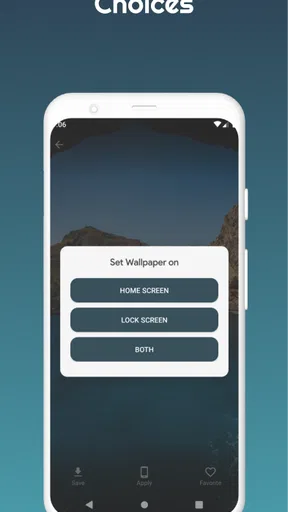
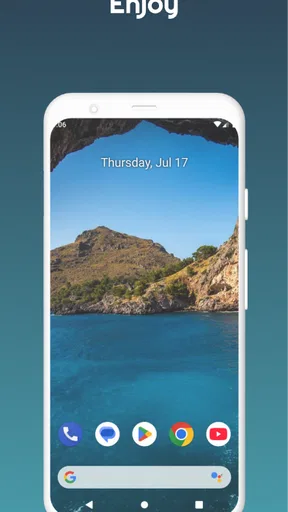
 Analysis by AppCompare
When I choose a wallpaper app, I care less about having endless images than about whether I can find one that feels right, save it, and use it without turning a small refresh into a chore. Everyday Wallpaper is aimed at that simple routine: browsing backgrounds, keeping favorites close, and changing the look of a phone when the current one starts to feel stale. It is a free personalization app from DUC LUONG, and its appeal is easiest to judge by how much control you want over that everyday task.
The practical question is whether you want a dedicated place to discover images or just need a single background you already have in mind. If you enjoy browsing and like the idea of returning to saved choices, the app’s focus makes sense. If you rarely change your wallpaper, or prefer to use a photo from your own camera roll without exploring a collection, your phone’s built-in wallpaper picker may be enough.
A small refresh that fits into a real routine
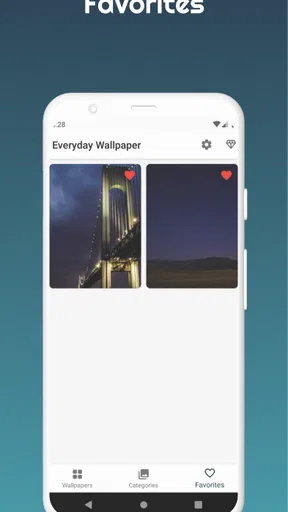
I can picture using it during a quiet moment in the morning: I open the app while waiting for coffee, browse a few backgrounds, and save one that suits the day rather than settling for the first image I see. Favoriting is useful here for a reason beyond convenience. It lets me build a short list of dependable options—perhaps one understated image for work, a brighter one for weekends, and a calm choice for evenings—without having to rediscover them every time.
That kind of personal shortlist is also a sensible way to avoid decision fatigue. A large wallpaper collection can be enjoyable at first and tiring when I only have a minute to choose. I would browse with a purpose, save a handful of images I genuinely like, and return to those before starting another long search. The app is most useful when discovery leads to a practical collection, not when browsing becomes the whole activity.
What to weigh before making it your default
Fresh images are only part of the decision. A background has to work behind app icons, widgets, and text, so a dramatic picture that looks great in a preview may be less readable on a crowded home screen. I’d check a candidate against the actual layout I use and favor images with calmer areas where icons sit. For a lock screen, where the clock and notifications compete for space, a different favorite may work better than the one I use on the home screen.
There is also a useful trade-off between novelty and consistency. A new look can make a familiar phone feel less monotonous, but a highly detailed image may make the interface feel busier rather than more personal. I would keep a few visually quiet choices alongside more colorful ones, then switch according to how I use the device. That approach makes saved favorites more valuable than simply collecting images I admire in isolation.
If you are deciding whether to install it, the basics are straightforward: it is free to download, rated for Everyone, and its current version is 1.0, with Android 6.0 or later required. The app has 100K+ installs, while its average rating is 0.0, so I would treat popularity as a sign that people are finding it, not as proof that it will suit every phone or taste. Optional in-app purchases range from $0.49 to $9.99 per item; I would check what is offered in the app before assuming every choice is included at no cost.
Worth Reading Before You Choose

EA SPORTS FC Mobile 26 Is a Bigger Football Game, but It Takes Time

Flipboard Shows What News Apps Must Do Beyond the Feed

Switching to Android Auto Means Rethinking Your Driving Routine

Google Calendar Makes a Crowded Week Easier to Manage

Ludo King Makes the Most of the Minutes Between Plans

Baby Panda World Brings Quick Play to Modern Phones, but Its Game Library Feels Busy
Compatibility is worth checking before you plan a routine around it. The listed minimum is Android 6.0, so an older device may not be suitable, and an iPhone user should not assume the Android version or its setup is available on iOS. If you are choosing for a family member, the Everyone content rating is reassuring, but I would still let them browse and decide whether the image styles suit them.
First Impressions and Setup
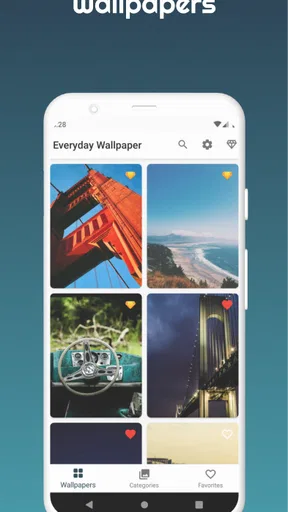
Getting started with Everyday Wallpaper was a breeze. The interface is super intuitive, so you don’t need a manual to navigate through it. I was up and running within minutes, which is always a plus in my book. Once you open the app, you’re greeted with a clean and simple layout that feels welcoming and not overwhelming.
The initial setup is straightforward. You can choose how often you want your wallpaper to change—daily, every few hours, or even manually whenever you feel like it. I went for the daily option to keep things fresh each morning when I grab my phone.
Exploring the Features
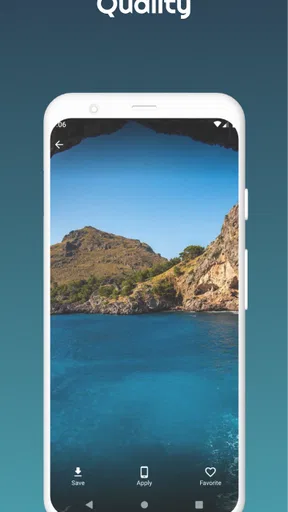
What really got me hooked is the sheer variety of wallpapers available. From breathtaking landscapes to abstract art, there’s something for everyone. And it’s not just about quantity; the quality is top-notch too. High-definition images make your screen pop, and I found myself spending way too much time just browsing through the options.
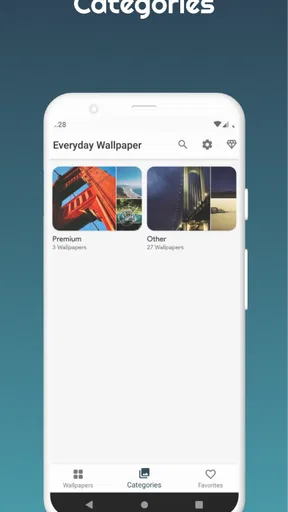
The app also offers categories to make your search easier. Whether you’re in the mood for something calming like nature scenes or something vibrant and energetic, you can filter your choices effortlessly. There’s even a nifty feature that lets you favorite wallpapers for easy access later.
Making the collection work for your screen
When I compare this approach with the usual alternatives, the distinction is less about which app has the biggest collection and more about how I want to choose. A built-in wallpaper picker is often the quickest route if I already have a picture saved. A general image-search app gives me broader discovery, but then I have to judge whether each result is suitable and keep track of the ones I like. Everyday Wallpaper is more appealing when I want browsing, categories, and favorites gathered around the specific task of changing a phone background.
I would still preview images on the device before settling on one. A bright subject near the top can clash with a lock-screen clock, while a detailed pattern beneath app icons can make the home screen harder to scan. A practical workflow is to favorite promising images first, then test them one at a time and remove the ones that look distracting in daily use. That small pause is more useful than choosing based only on an attractive thumbnail.
One thing I would not assume is that every image will suit every display or layout equally well. Even an HD wallpaper can feel awkward if its focal point is hidden behind icons or cropped in a way that changes the composition. I would treat the collection as a set of starting points rather than expect every image to be an instant fit. If exact framing matters to you, a photo editor or your device’s own crop controls may be a better final step.
User Experience
Using the app daily, I noticed that it works seamlessly without any hitches. The wallpapers change automatically as scheduled, and I haven’t experienced any lag or crashes. It’s lightweight, so it doesn’t hog your device’s resources, which is something I really appreciate.
Another thing I love is the customization options. You can tweak the settings to suit your preferences, like adjusting the brightness or adding a blur effect for a softer look. There’s a lot of flexibility, which means you can truly make it your own.
Choosing a change schedule you’ll keep
Automatic changes sound convenient, but I would start with a slower rhythm rather than switch images so often that the phone never feels settled. A daily change can make sense if you enjoy a small visual surprise; manual selection is better if you rely on a consistent background for work or accessibility. Before enabling a schedule, I’d make sure the images it rotates through are all ones I would be happy to see, rather than leaving a favorite list full of experiments.
Brightness and blur are worth treating as finishing controls, not as a way to rescue every image. A softer treatment can help a busy background recede behind icons, while reducing brightness may make a vivid choice less tiring to look at. I would adjust one setting at a time and check the result on the actual screen. The best-looking preview is not always the easiest background to live with for a full day.
For someone who changes phones or rearranges a home screen often, there is a small cost to consider: a wallpaper that worked with one icon layout may not work with another. I would keep the original favorites rather than rely on one carefully tuned image, so I can quickly switch if the screen becomes cluttered. This is a simple habit, but it makes regular personalization feel reversible instead of like a project.
Where another kind of wallpaper tool may fit better
Everyday Wallpaper is not automatically the right choice for people who want to design a background from scratch, apply elaborate effects, or organize a large personal photo archive. A dedicated editing tool is a better fit when text, collages, or precise composition are the point. Likewise, if I already have a meaningful photo and rarely want anything else, using the phone’s own image picker avoids adding another browsing step.
It may also be the wrong choice if you want complete certainty about the source and style of every image before browsing. The app’s appeal is discovery and variety, which naturally means that the best match can take a little searching. I would skip it if I dislike exploring collections, do not want optional purchases to be part of the experience, or need a wallpaper workflow that is tightly integrated with a different platform. It is an Android app with a stated minimum of Android 6.0, so iPhone owners should look for an option made for their device rather than expect the same setup.
Why It Stands Out
What sets Everyday Wallpaper apart is its community-driven approach. Users can upload their own images, which adds a personal touch and a never-ending stream of fresh content. This feature not only diversifies the collection but also gives a platform to budding photographers and artists to showcase their work.
Plus, the app's developers seem committed to keeping it up-to-date. Regular updates mean new features and improvements, ensuring the app stays relevant and functional over time. I always find it reassuring when developers are actively involved with their creation.
Switching without making it a chore
Trying a new wallpaper app does not have to mean abandoning the way I already personalize my phone. I would begin by saving a small set of images that suit different contexts, then compare them with the background I currently use. If the new choice makes icons harder to spot or feels too vivid after a few hours, switching back is an easy test—not a reason to keep an image just because I spent time finding it.
The more meaningful cost is attention. Browsing can eat into a break if I keep scrolling without a clear idea of what I want. Categories and favorites help narrow the process, but I would set a simple goal before opening the app: find one calm image, one colorful option, or a replacement for a background I have grown tired of. That keeps discovery enjoyable and makes it easier to tell whether the app genuinely fits my habits.
My practical recommendation is to try it for a specific reason, rather than install it expecting a complete redesign of your phone. If you want a regularly refreshed choice and enjoy saving images for later, its focused browsing makes sense. If your priority is strict control over image editing or using only your own pictures, another tool—or the built-in wallpaper settings—will probably be less effort.
Final Thoughts
All in all, Everyday Wallpaper is a delightful app that elevates the look and feel of your device effortlessly. It’s perfect for anyone who loves a bit of variety and wants to keep their home screen looking fresh and exciting. Whether you’re a casual user or someone who takes their wallpapers very seriously, this app has something to offer.
So, if you’re ready to say goodbye to bland backgrounds and hello to a vibrant visual experience, give Everyday Wallpaper a try. You might just find your new favorite app.
My clearest advice is to judge it by the everyday result, not the amount of time spent browsing. Save a few candidates, check how they sit behind your icons and clock, and keep the ones that remain comfortable to look at after the novelty fades. That is where this kind of app earns its place: not by changing a screen for its own sake, but by making a small personal refresh easy to repeat.
Pros
- Beautiful selection of high-quality wallpapers.
- Easy to navigate with a user-friendly interface.
- Regular updates with new wallpaper additions.
- Customizable settings for personal preferences.
- Supports both portrait and landscape modes.
Cons
- Limited free options without premium subscription.
- Some wallpapers may not fit all screen sizes.
- Occasional ads in the free version.
- Requires internet connection for updates.
- No option to create custom wallpapers.
FAQs for Everyday Wallpaper
What is Everyday Wallpaper and how does it work?
Everyday Wallpaper is an app designed to automatically update your device's wallpaper daily. It pulls images from a variety of high-quality sources, ensuring fresh and visually appealing backgrounds each day. Users can customize settings to focus on specific themes or categories, making it easy to personalize their experience.
Can I choose specific themes for my wallpapers?
Yes, Everyday Wallpaper allows users to select from a range of themes such as nature, architecture, abstract art, or seasonal images. You can set your preferences in the app settings, ensuring that the wallpapers align with your taste and keep your device looking fresh and exciting every day.
Does Everyday Wallpaper require an internet connection?
While Everyday Wallpaper does require an internet connection to download new wallpapers, it also offers an offline mode. This mode saves previously downloaded images, allowing the app to continue updating your wallpaper even without a current internet connection, ensuring you always have a fresh background.
Is Everyday Wallpaper compatible with all Android and iOS devices?
Everyday Wallpaper is designed to be compatible with most Android and iOS devices. However, to ensure optimal performance and access to the latest features, it is recommended to check the app store listing for specific device compatibility and operating system requirements before downloading.
Does the app consume a lot of battery or data?
Everyday Wallpaper is optimized to minimize battery and data usage. The app downloads images in the background, using efficient data management. Users can also choose to limit updates to Wi-Fi connections only, reducing data consumption. Battery impact is minimal, as the app operates primarily during low-activity periods.


